
We are aware that grasping the ever-changing and ever-updating realm of online advertising can often seem unfathomable at best. However, there are certain ways you can optimize your outputs if you follow a few golden rules when it comes to efficient campaign management. releaseMyAd is the top online advertising solutions destination, and our experts have formulated a few tips that can contribute to the smooth functioning of your AdWords account. These tips and tricks can effectively help you become a pioneer of AdWords account management by assisting you in constantly improving your Return on Investment (ROI) and lowering your cost-per-conversion:

1.Sort your keywords
Set yourself a time period of 30 or 60 days. Now, view your list of keywords and select those which have had a high cost-per-conversion rate in your desired time-frame. Also check if you have any keywords that haven’t converted yet, but are costing you precious money. Now, pause off these ad groups and keywords so that you can invest more money in new keywords.
2.Remove Negative keywords
Another easy way to decrease your Cost per Lead (CPL) is by removing any negative keywords that might be present. To filter out negative keywords, first select high-cost keywords that aren’t converting, and those which have a high CPL. Choose the ‘See Search Terms’ option to view the search terms, copy them and add them to your negative keywords list.
3.Optimize your Ad Groups
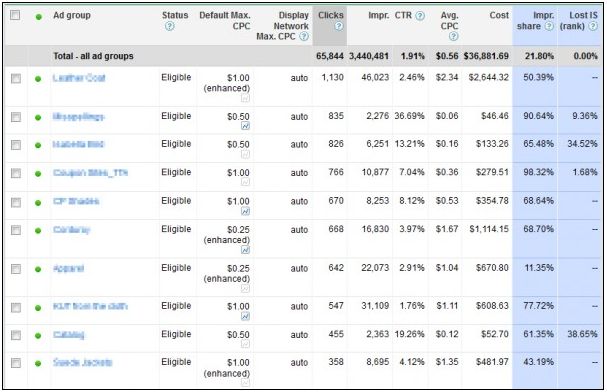
Scan your Ad Groups ad-by-ad and analyze the performances of each. Make sure the top performing ads are visible, and pause off the poor ones. Also, constantly try to devise new ads for each ad group and come back later to analyze their performances.
4.Analyze Geographic Data
Go to your Search Terms Report to view and analyze data geographically. To achieve this, go to the Dimensions Tab and select Geographic sorting under the View menu. Start off with the broad category of Country/Territory and search for regions that have a high cost-per-conversion, or are showing zero conversions. Simply pause your campaign in these regions.
5.Check Hourly Data
Similar to the way you analyzed data by order of region, you can do the same with respect to time. You can see when people search for your keywords, and take necessary actions. To view the data, go to Dimensions tab, select View and then choose Time and choose the option of viewing data according to Hour of Day. Keep a note of hours which have a high cost-per-conversion rate or no conversions, and you can choose to exclude these times, or schedule them to lower bids.
6.Evaluate Device Data
 You can choose to segmentally view your campaigns’ traffic and conversions from different devices. You have the option of excluding devices on which your campaign isn’t doing well. Excluding these devices from your campaign might improve your ROI and considerably decrease your overall CPL.
7.Inspect Network Data
You can segment your campaigns by network and analyze their performance data in Search and Display networks and execute necessary changes.
8.Configure Automatic Ad Placements on your Display Network
View and sort your automatic placements, check to see which ones are about your desired CPL goal. You can exclude them immediately. You can also sort these placements based on cost and choose to exclude any placement that is unable to show any conversions.
9.Configure Managed Placements on your Display Network
You can sort your managed placements based on CPL, and consequently remove ones which are beyond your goal. You can also remove any placements that fail to accumulate any conversions.
10.Budget Your Biddings

This is fundamental concept, but one which is often overlooked. Decide upon a fixed daily budget based on how much you want to spend per day on clicks. Also, while you’re at it, try to get the best possible price per click. Another way to significantly decrease your budget would be to align the content of your ads and your landing page. When the terminology differs significantly on the previous two, the cost per click also increases considerably.
You can also start your own AdWords campaign via releaseMyAd in a few simple steps. You can specify your exact requirements on our online form, following which you can expect your AdWords campaign to be off and running. In case you have any queries, you can always call us on 09836068426, or mail us at online@releasemyad.com.
Related Posts

Explore Online Advertising Possibilities via releaseMyAd
[caption id="attachment_23830" align="alignright" width="383"] Online Advertising Agency in Ahmedabad[/caption] William…

Niche Marketing through releaseMyAd’s Keyword Niche Finder
Just a few days back I had been to my…
Supercharge your Google Adwords Campaign Management services via releaseMyAd
A Google Adwords campaign determines your website visitors. It is…